Getting Started
This site walks through getting started with Jupyter notebooks and Python (as well as FRED, Visual Studio Code, GitHub, and Copilot).
You are not expected to know any of this in advance.
The goal is to make sure everyone can access the tools and use them.
What You’ll Do Here
Use JupyterHub at William & Mary
You’ll learn how to create and use Jupyter notebooks in your browser and
Access economic data from FRED
You’ll see how to pull real macroeconomic data from the Federal Reserve Economic Data (FRED) database and use it inside notebooks.
Create a GitHub account and a repo
You’ll set up a free GitHub account, your first repo, and learn the basics of git.
You’ll configure JupyterHub so you can
open notebooks directly from GitHub
commit changes to your repositories
This step allows you to program collaboratively and keep track of changes to your work.
Install and setup Visual Studio Code
You’ll learn how to install and setup
Visual Studio Code
Python
Jupyter and Python extensions
GitHub Copilot
This gives you a powerful local setup, but everything in the course can still be done through JupyterHub if needed.
Jupyter
“A notebook is a shareable document that combines computer code, plain language descriptions, data, rich visualizations like 3D models, charts, graphs and figures, and interactive controls. A notebook, along with an editor (like JupyterLab), provides a fast interactive environment for prototyping and explaining code, exploring and visualizing data, and sharing ideas with others.” (See the Project Jupyter Documentation)
Python
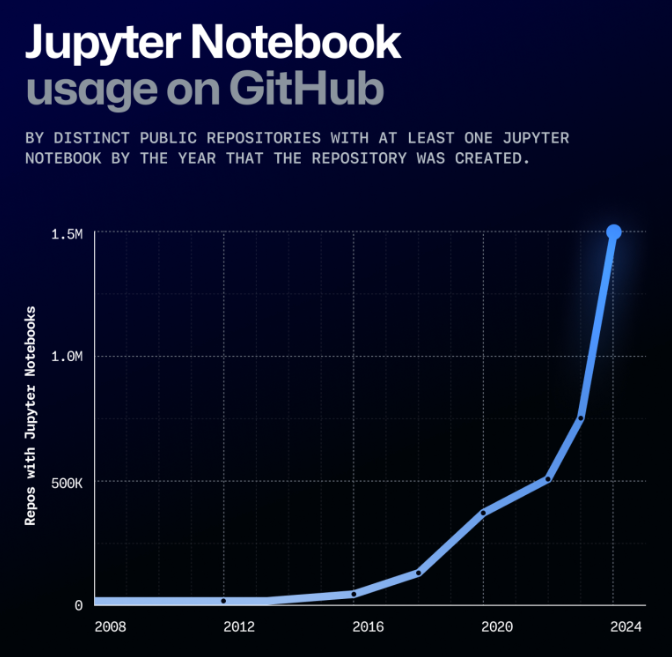
“In 2024, Python overtook JavaScript as the most popular language on GitHub, while Jupyter Notebooks skyrocketed”. Octoverse: AI leads Python to top language as the number of global developers surges